Step 1 of 19 · The front door · screen 2 of 4
The workbench opens
The gesture
Paste the press release into What do you want to do? and press Begin.
So far
Nothing yet. This is where the study begins: you have one sentence of a press release, and a machine you have not used before.
Why now
A study starts from material, not from a menu. The machine reads what you brought, chooses the programme that fits it — here press-release — and lays out that programme's figures. The choice is recorded together with its reason, so you can always see why you are where you are.
What it reached
17 records: your sentence (intent.given, #2), the programme chosen for it and why (#6), and the programme's five figures laid out and waiting — four questions and a report.
Frame · Focus · as of offset 17 · just after the gesture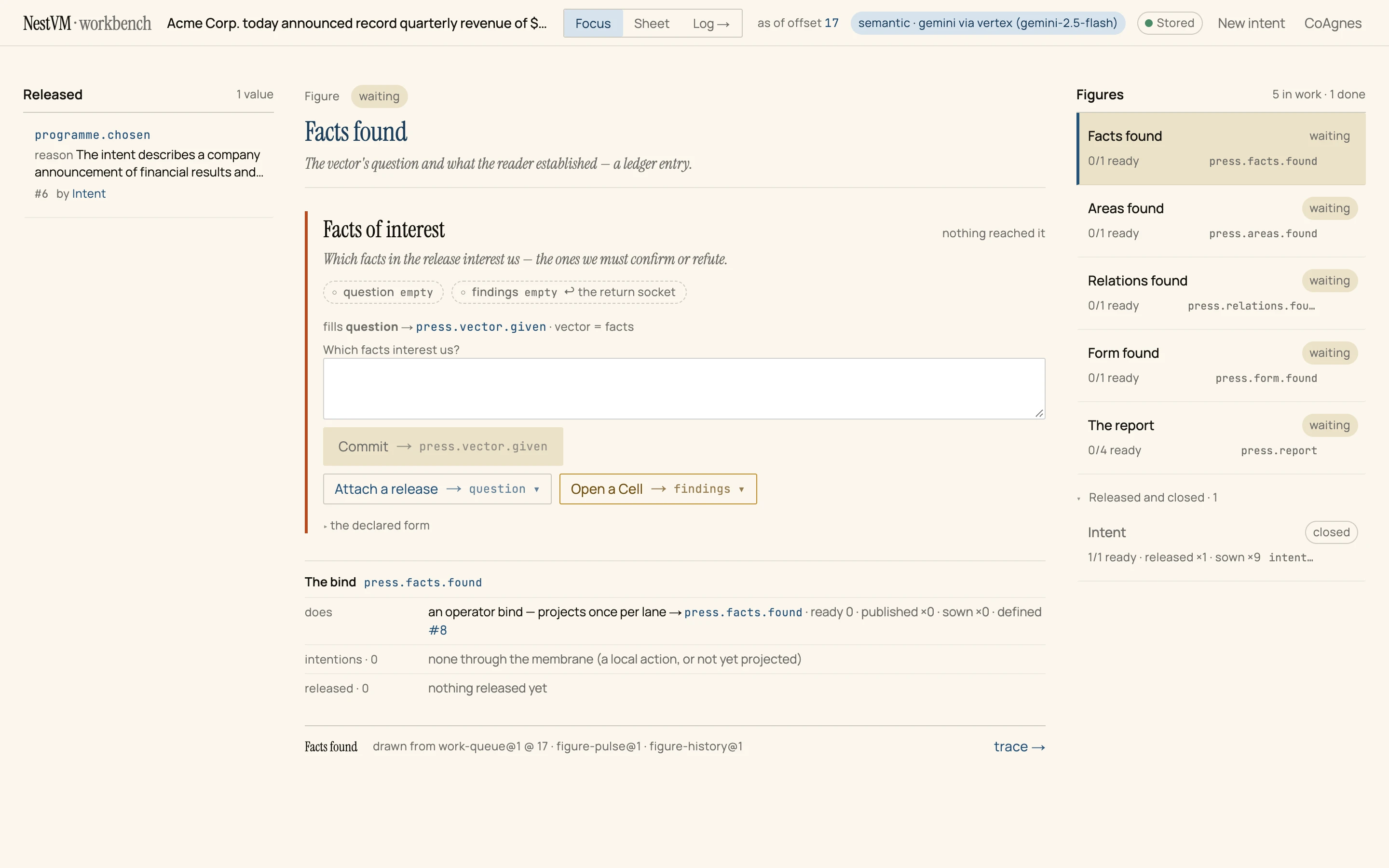
- Released. The first thing the machine published:
programme.chosen, #6, with the reason for its choice. - The figure in focus, Facts found, is waiting: it has a question to hear and findings to receive, and has neither.
- Figures. The whole programme at a glance: four lines of questioning and The report, which waits for all four.
- As of offset 17. Seventeen records exist, #0 to #16. Every picture of this walk carries this number.